


Modelling a Real CMS on Wix Studio — Beyond the Default Collection
How to model Wix CMS so editors love it, content scales, and the site does not collapse in week three. Collections, reference fields, taxonomies, and the patterns that hold.
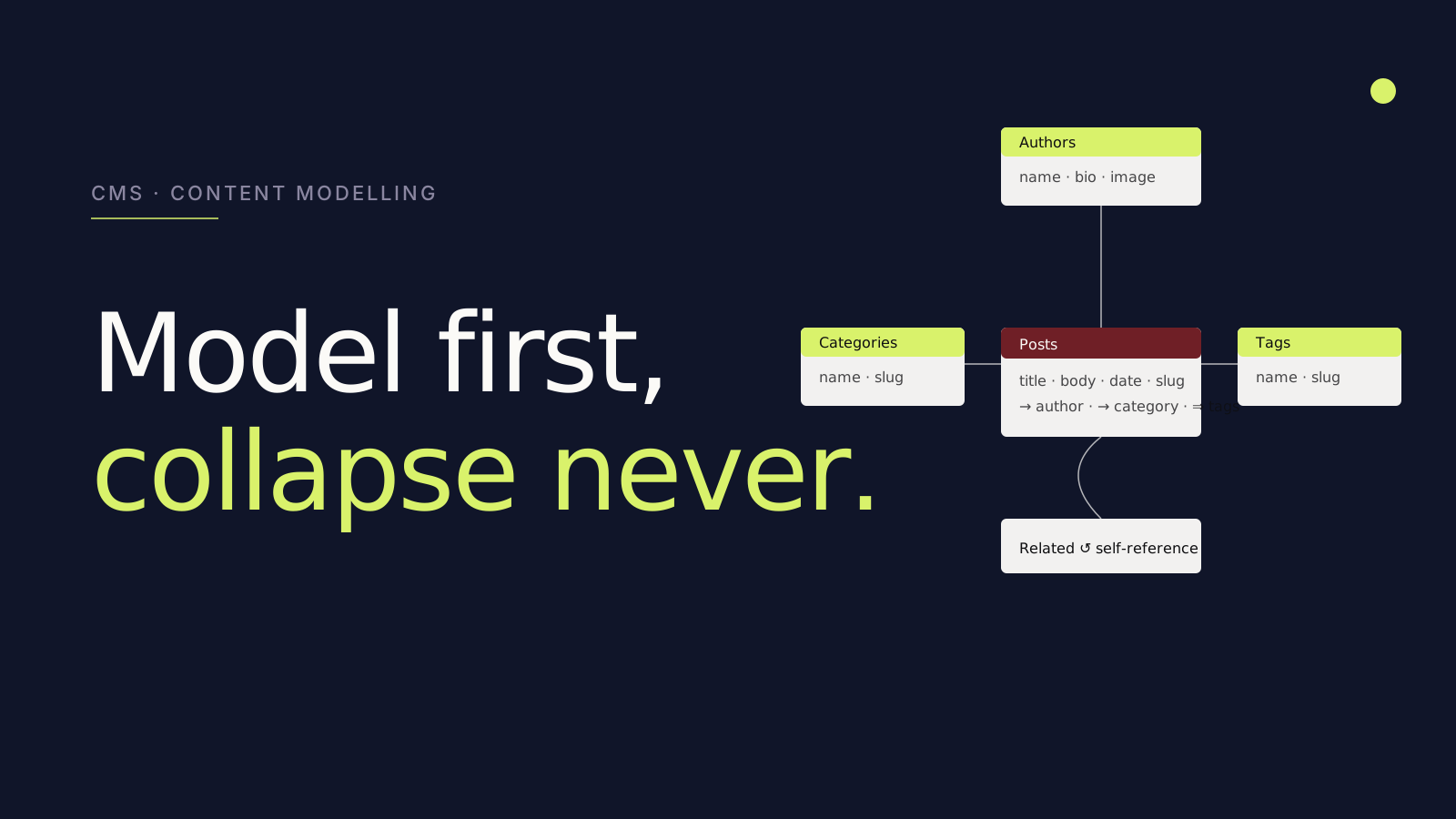
The default Wix CMS pattern most agencies ship — one collection per content type, no reference fields, no taxonomy — collapses in week three of real use. The model below is how we build a Wix Studio CMS that editors keep using a year later.
The collapse pattern
Default Wix CMS in the wild looks like this:
- One Blog Posts collection. All categories. No structure.
- One Team collection with everything in flat fields.
- One Case Studies collection — same.
- No relationships between them.
Editors hate it because adding a new post means cutting and pasting category strings ("studio", "studio ", "Studio" — three different categories Google sees).
Search engines hate it because tag pages cannot be generated cleanly, internal linking is impossible to template, and faceted filtering breaks.
We have audited this pattern 200+ times. It always rots.
The model that holds
Split by purpose, link by reference. For a blog:
- Posts collection — title, body, summary, image, publish_date, slug.
- Categories collection — name, slug, description. (Single row per category.)
- Tags collection — name, slug.
- Authors collection — name, bio, image, social links.
Posts gets reference fields to Categories (single-reference), Tags (multi-reference), and Authors (single-reference).
Now your taxonomy pages can be generated from the Categories or Tags collections. Authors get their own pages. Internal linking is templated. Edits ripple correctly.
Reference fields are the magic
Reference fields are how Wix CMS becomes a real database. A Service collection with a reference to Industries means a service page can list "Industries we serve" automatically. Add a new industry, and the link appears wherever it should.
Multi-reference fields are even more powerful. A Case Study with multi-reference to Services and Industries surfaces in every relevant filter on the work index, without manual tagging.
Taxonomy discipline
Categories and tags need rules:
- Categories are exclusive — a post is in one category.
- Tags are descriptive — a post can have many.
- Slugs are URL-stable — chosen once, never changed.
Document this in a one-page editor guide. Hand it to the team at launch.
Programmatic pages
The most powerful Wix CMS pattern: programmatic page generation from a collection.
Need 200 "service in city" pages? A collection with rows for each city + service combination, plus a Wix Studio dynamic page bound to it, and the pages generate. Each page is fully customisable per row (title, meta, body content), individually indexable, individually rankable.
We have built sites with 1,000+ programmatic pages this way. The CMS is the source of truth; the editor manages content; Wix generates pages on demand.
Indexes and performance
For collections with 500+ rows, Wix CMS performance depends on indexes. Wix Data lets you add indexes on fields used in .eq(), .find(), or .hasSome() queries. Without them, queries scale linearly.
We index every field used in a filter, sort, or join. Test query performance during build; do not discover it in production.
Permissions
Most teams ignore the permissions layer until something breaks. The defaults:
- Public read for content collections — public blog posts, public case studies.
- Site member read for gated content — premium articles, member-only resources.
- No public write ever, unless explicitly intentional (e.g., a comments collection).
Set permissions at creation time, not later.
Editor experience
The forgotten dimension. After modelling, use the CMS as an editor for ten minutes. Can you add a new post in under three minutes? Can you find the category dropdown? Does the field order make sense?
If editing feels clunky to you, it will feel hostile to a marketer. Rename fields, reorder them, add help text. The CMS is a product. Editors are users.
A complete example: a content site
For a content marketing site we shipped this year:
- Posts (title, body, summary, hero image, publishdate, slug, readingtime).
- References: Authors (single), Categories (single), Tags (multi), Related Posts (multi-self-reference).
- Authors (name, bio, image, role, social).
- Categories (name, slug, description, color).
- Tags (name, slug).
- Pages (for marketing pages — title, slug, body, metatitle, metadescription).
- CaseStudies (linked to industries and services via multi-reference).
Five collections. Every relationship explicit. Every URL templatable. Editors love it; the site has scaled from 12 to 180 posts without a structural change.
The takeaway
A Wix CMS modelled like a real database scales. A Wix CMS modelled like a checklist collapses. The modelling work happens in week 1-2 of the engagement; the editor experience is shaped for years. Spend the time.